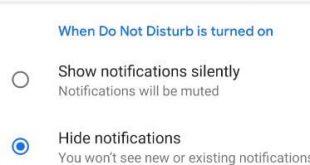
Here’s how to set up and customize Do not disturb mode in Android 9 Pie. When Do not disturb is turned on in your Android Pie 9.0, you’ll receive all notification silently or hide notifications. If you want to hide notifications, your device won’t make a sound or vibrate. While …
Read More »How to Use Smart Folder In OnePlus 6 to Automatically Create Folder Name
Here’s how to use Smart Folder In OnePlus 6/6T. This OnePlus 6 smart folder feature is automatically creating folder names related to apps when you create a new folder. If you move app related to the game, it’ll create a game folder or if you move the WhatsApp app to the Snapchat …
Read More »How to free up space in OnePlus 6
OnePlus 6 device has splendid 6.28-inch Optic AMOLED display, 6 GB/8 GB of LPDD4X RAM, 64 GB / 128 GB / 256 GB storage and Snapdragon 845 chipset. This storage capacity is enough for download and enjoys videos, movies and other activities. Several users facing storage space running out problem …
Read More »How to change battery icon in OnePlus 6 Status bar
By default set battery icon in status bar in OnePlus 6 Oxygen OS and other devices. You can add or remove battery style icons and also customize status bar on OnePlus 6 using customization settings. Let see how to change battery icon in OnePlus 6 Status bar. In OnePlus 6 …
Read More »How to Clear or Close All Apps in Android 9 Pie
Want to clear recent apps Android? Here’s how to close all apps on Android Pie 9.0 running in the background. Before Android P Beta 2 or Developer Preview 3, you can only individually clear a recent app in your Android Pie 9.0. We use several apps in daily life and directly …
Read More »How to Download Android P Beta 2 on Google Pixel Devices
Recently updated my Google Pixel device to Android P Beta 2 (Developer Preview 3). Android P developer preview 3 is now available for Google Pixel XL, Google Pixel, Pixel 2, Pixel 2 XL, and other compatible devices such as OnePlus 6, Vivo X21, Nokia 7 Plus, Oppo R15 Pro, Sony …
Read More »