how to

Discover helpful tips and step-by-step guides on various topics. Learn how to do things easily and efficiently with BestUsefulTips.

How to Customize the Home Screen on Samsung Galaxy S10e

How to customize home screen settings on Galaxy S10e

Here’s how to customize home screen settings on Galaxy S10e. This Samsung Galaxy S10e home screen settings include home screen grid size, app screen grid size, app icon badges, home screen layout, add the new app icon to the home screen, quick open notification panel, hide apps, and more. Change …

Read More »

How to Set Up Galaxy S10e Always On Display

How to change Galaxy S10e always on display settings

By default enable Always-on display in your Samsung galaxy S10e. Here’s how to set up or change Galaxy S10e always-on display settings. When turning on always-on display galaxy S10e, you can see date & time, battery icon and notification on the lock screen without unlocking your Samsung Galaxy device. Find …

Read More »

How to Activate Fingerprint on Samsung Galaxy S10e

How to set up fingerprint recognition in Galaxy S10e

Here’s how to set up and use fingerprint recognition in Samsung Galaxy S10e. We use biometrics security to secure your important data in your devices such as Fingerprint Scanner, Face Recognition, and other biometrics preferences. In Samsung Galaxy S10e, you can find the fingerprint sensor on the power button (Side …

Read More »

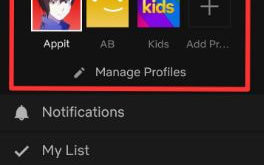
How to switch user profile on Netflix Android

How to switch user profile on Netflix Android

Want to switch profiles on Netflix android or smart TV or Roku? Here’s how to switch user profile on Netflix Android phone or tablet. If you have premium ultra HD plan subscription, you can create 4 Netflix profile at a time and download Netflix videos to watch offline up to …

Read More »