Last Updated on February 16, 2026 by Bestusefultips
If you recently bought the Samsung S25 and don’t know how to power it off, don’t worry. On the latest Samsung Galaxy S25, the power button works slightly differently compared to older Samsung phones.
Here’s a complete guide explaining all the ways to restart or turn off your Galaxy S25.
Read More:
How to Turn Off (Power Off) Samsung S25 Ultra/S25 Plus/S25 Edge/S25
Easy to turn off Samsung Galaxy S25 series using the settings below.
Method 1: Use Side Button + Volume Down (Quickest Way)
- Press and hold the Side Button + Volume Down together
- Hold for about 2–3 seconds
- The Power Menu will appear
- Tap Power Off
- Tap Power Off again to confirm
Your phone will now shut down.
Read More: Change Side Button to a Power Button on Samsung
Method 2: Turn Off Using Quick Panel

- Swipe down from the top of the screen
- Swipe down again to expand Quick Settings
- Tap the Power icon in the top-right corner
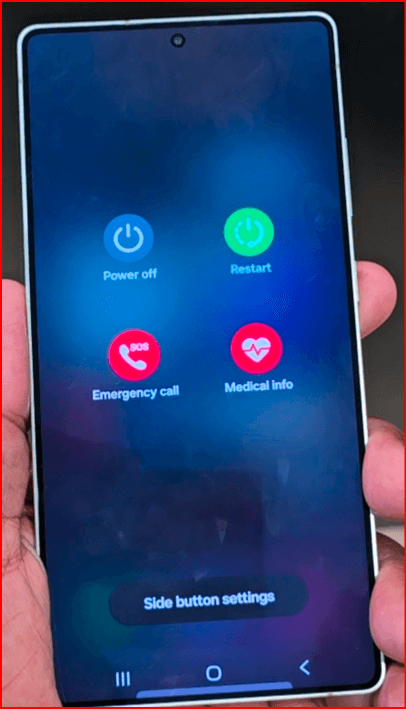
4. Select Power Off.
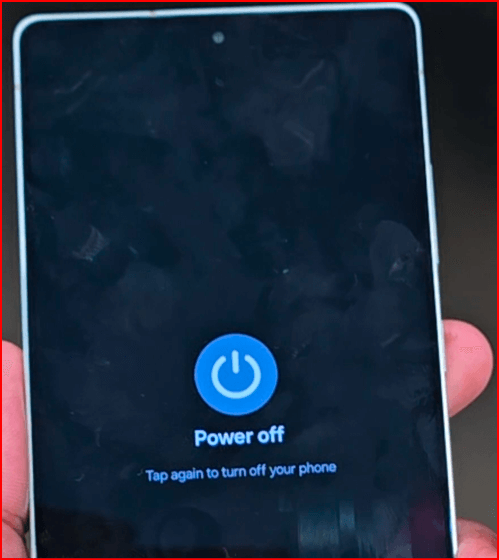
5. Tap Power Off again to turn off your Samsung phone.
This method is helpful if your physical buttons are not working.
Method 3: Change Side Button Settings (Optional)
By default, pressing and holding the Side button may open Gemini instead of the Power menu in the latest Samsung phones.

To change it:
- Go to Settings
- Tap Advanced features
- Select Side button
- Under “Long press,” choose the Power off menu
Now holding the Side button alone will show the power options.
Related Feature: Samsung Accidental Touch Protection Feature
How to Force Restart Samsung S25 (Frozen Fix)
If your phone is frozen:
- Press and hold Side Button + Volume Down for 7–10 seconds
- The phone will automatically restart
This is useful when the screen is unresponsive.
Difference Between Power Off & Restart
- Power Off → Completely shuts down the phone
- Restart → Turns off and automatically turns back on
Restarting is useful for fixing minor bugs and improving performance.
How to Turn Off Now Brief on Samsung S25
To disable Now brief:
Settings > Lock screen and AOD > Now bar > Toggle off Now Brief
Final Thoughts
Turning off the Samsung Galaxy S25 is simple once you know the correct button combination. Whether you use the Side button shortcut or the Quick Panel method, both options are quick and safe.