how to

Discover helpful tips and step-by-step guides on various topics. Learn how to do things easily and efficiently with BestUsefulTips.

How to get Fornite beta on android phone

How to get Fortnite Beta on android

Here’s how to get Fortnite Beta on android phone. This epic game Fortnite for android is battle royale shooter game. To install fortnite on android device, first of all sign up with your email id on this Fornite page. After sign up, you’ll wait for email invitation link to download …

Read More »

How to Customize Active Edge on Pixel 3 and Pixel 3 XL

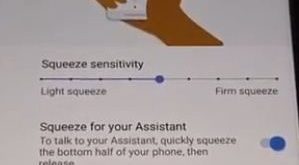
How to customize Active Edge on Pixel 3 XL

Here’s how to change the active edge squeeze settings on Pixel 3 and Pixel 3 XL. You can customize Active Edge on Pixel 3 XL under gesture settings. In Google Pixel active edge setting, you can see squeeze for your assistant, squeeze for silences and access assistant even the screen …

Read More »

How to Use the S Pen on Galaxy Note 9 Camera

How to use S Pen on Galaxy Note 9 Oreo

Here’s how to enable and use S Pen on Galaxy Note 9. This Samsung Note 9 S Pen stylus is useful to play or pause music, take a photo without touch your Note 9, open app, unlock your device remotely, create a note, and more. Also, use S Pen as …

Read More »

How to Set Up Intelligent Scan on Galaxy Note 9

How to set up and use Intelligent scan on Galaxy Note 9

Want to use an Intelligent scan on galaxy Note 9 to unlock your device? Let see how to set up and use Intelligent scan on Galaxy Note 9 to secure your phone data. In Samsung note 9 biometric security, you can see various options including Intelligence scan, Face recognition, Iris …

Read More »

How to Set Up and Use Face Recognition on Galaxy Note 9

How to set up face recognition on galaxy Note 9 Oreo

You can see various Biometrics security options available in your Samsung Galaxy Note 9 such as Intelligence scan, Face recognition, Iris scanner, and Fingerprint scanner. But in this tutorial, I’ll show you how to set up face recognition or face unlock on Galaxy Note 9 devices. To use face recognition …

Read More »