Last Updated on July 1, 2026 by Bestusefultips
WhatsApp Username is finally here! In this article, I’ll explain you how to reserve WhatsApp username, how to set up a WhatsApp username, and everything you need to know about the latest WhatsApp Username update. Follow the below given step-by-step guide to create your WhatsApp username, reserve your preferred username before someone else does, and enhance your privacy without sharing your phone number.
Several users already got notifications about reserve username for WhatsApp account on Android or iPhone devices. You can also change WhatsApp username using this tutorial. Let’s see how to use WhatsApp username feature on your Android or iPhone devices.
Don’t Miss This: What’s New in Android 17 Beta
How to Reserve WhatsApp Username on Android: Samsung Galaxy, Google Pixel, Vivo, Oppo, Motorola
Open the WhasApp app on your device.
You can see the notification message of WhatsApp username, tap on it if available.
In my Google Pixel device, we already reserve WhatsApp username. So, let’s see the settings to edit WhatsApp username on Android.
How to Change Username on WhatsApp Android
Step 1: Open the WhatsApp app.
Step 2: Tap on Three vertical dots in the top right corner.
Step 3: Tap Settings.
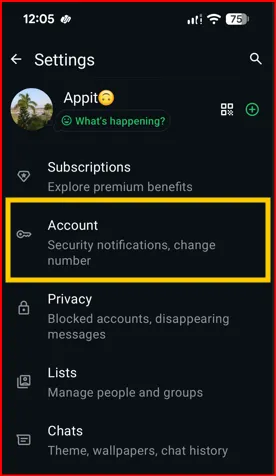
Step 4: Tap Account.
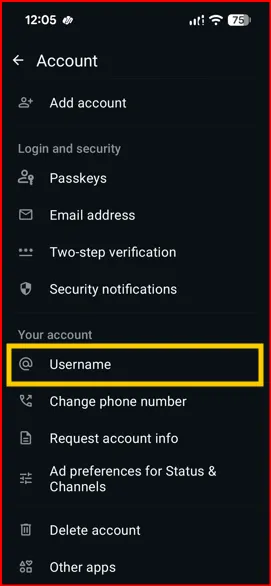
Step 5: Tap Username in your account section.
We already reserved my WhatsApp username.
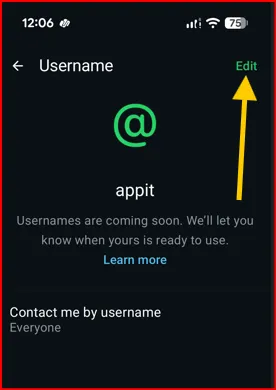
Step 6: Tap Edit in the top right corner.
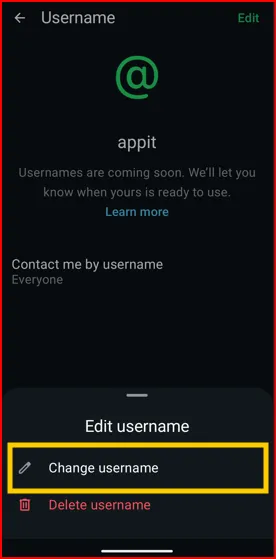
Step 7: Tap Change username (Another option is Delete username)
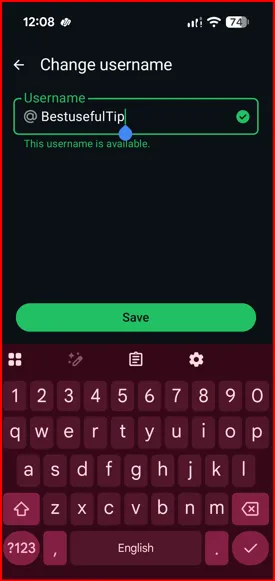
Step 8: Enter the username and tap Save.
You can set your Instagram username as WhatsApp username. You must log into Instagram account and add your account here.
Step 9: Tap Contact me by username to choose who can contact you using your username.
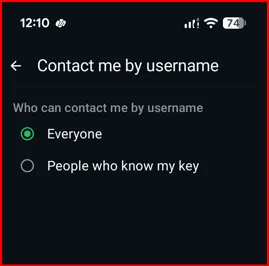
Step 10: Choose from Everyone or People who know my key.
When you choose a people who know my key, you can see the WhatsApp username key. Just save your key and share with any contact you want to chat without sharing your mobile number.
That’s all about WhatsApp username feature update 2026.