Tag Archives: OnePlus 5

How to Use App Locker in OnePlus 5 and OnePlus 5T

Use app locker in OnePlus 5 and OnePlus 5T

OnePlus 5 has several amazing features and one of them we discuss here is app locker. OnePlus 5 app locker feature is useful to hide apps or lock apps in your OnePlus devices. To hide important apps in your OnePlus device, you can use app locker in OnePlus 5 and …

Read More »

How to Disable App Shortcuts on OnePlus 5

Disable app shortcuts on OnePlus 5

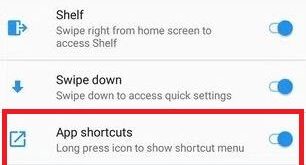
Here’s how to disable or change lock screen app shortcuts on OnePlus 5/OnePlus 5T. By default enable app shortcuts on OnePlus 5. Long press icon to show app shortcuts menu on OnePlus 5 device. If you don’t want to show app shortcuts on your device’s home screen, disable app shortcuts …

Read More »

How to Change Bluetooth Audio Codec on OnePlus 5T

Change Bluetooth audio codec on OnePlus 5T

OnePlus 5T has several amazing features including Reading mode, Gaming Do not disturb, vibration pattern & vibration intensity, parallel apps, Shot on OnePlus watermark, and more. But in this tutorial, I will show you steps to change Bluetooth audio codec on OnePlus 5T/OnePlus 5. This Bluetooth audio codec feature is …

Read More »

How to Use Pro Mode On OnePlus 5T

Use Pro mode in OnePlus 5T camera

OnePlus 5T has several camera tips but in this tutorial, I will show you how to use Pro mode on OnePlus 5T to take a good picture. In OnePlus 5/OnePlus 5T camera Pro mode, you can adjust Histogram, save RAW photos, shoot straight photos, picture information, save specific preset and …

Read More »

How to enable Night mode on OnePlus 5T

Enable Night mode on OnePlus 5T

OnePlus 5T has a several awesome features, one of them we discuss here is Night Light mode. Here’s how to enable Night mode on OnePlus 5T. By default turn off Night mode in your OnePlus device. You can turn on night mode on OnePlus 5T using display settings in your …

Read More »

OnePlus 5T Advanced Settings

OnePlus 5T advanced settings

Here’s the list of OnePlus 5T advanced settings. In this advanced settings, you can see accessibility, printing, pocket mode, OTG storage, recent app management, schedule power on/off, Gaming Do not disturb, and Bluetooth Audio codec. Let see one by one all OnePlus 5T advanced settings. Read Also: How to change …

Read More »