Last Updated on February 20, 2026 by Bestusefultips
Android 17 Beta 1 has officially arrived, bringing new features, system improvements, and visual changes for Google Pixel devices. In this article, we explain what’s new in Android 17 Beta 1, including UI updates, Widget search, performance optimizations, and early feature additions compared to the previous Android 16 builds.
If you’re using a compatible Google Pixel device or planning to install Android 17 Beta, this tutorial covers all the important changes and new features you need to know.
Android 17 Beta 1: All Changes
Check out the following top changes on the Google Pixel device running Android 17 Beta 1.
Change Search Widget on Home Screen
You can see a list of new shortcuts to add to the search bar, such as AI mode, Live, Song search, Weather, Translate, Finance, Sports, etc.
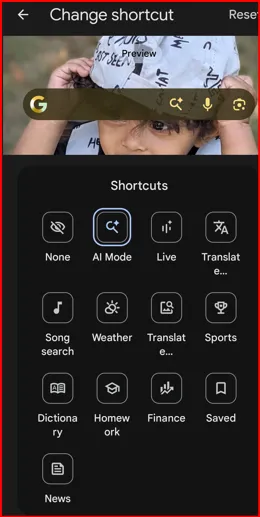
To change the search widget: Long-press on the Search bar widget on your Pixel home screen > Widget settings > Change shortcut > Choose a shortcuts you want to add to the search widget
New Volume Overflow Icon
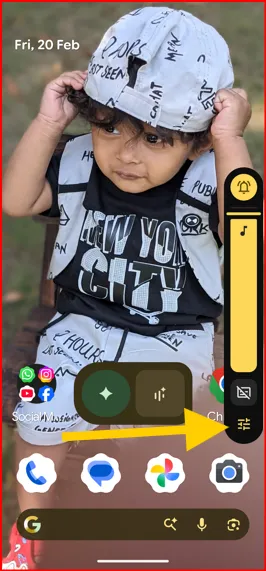
Press the Volume up or down button, and you can see the volume bar with a new overflow icon (Android 17 Beta) instead of three dots (Android 16)
Gemini Screen Shrink Animation for Corner Swipe
Swipe up from the bottom corner to access the Gemini screen on your Pixel. If you can’t access it, make sure to enable swipe to invoke the assistant.
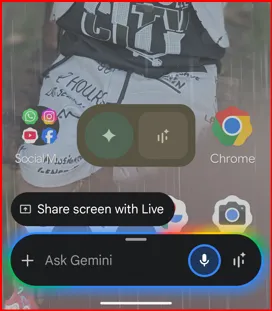
To enable: Settings > System > Navigation mode > Choose a Gesture navigation > Settings Gear icon > Toggle on Swipe to invoke the assistant
More Compact Settings in the Menu
Remove the vertical heights from the menu for a compact look.
Updated Brightness Icon
Darker Location Indicator Icon
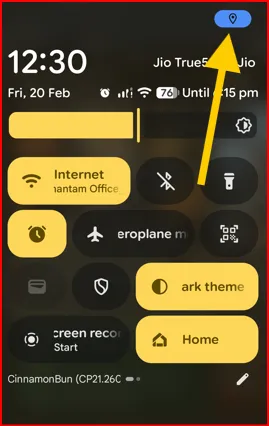
When you enable location, you can see a darker location icon in the top-right status bar compared to the previous version.
Android 17’s Codename is CinnamonBun
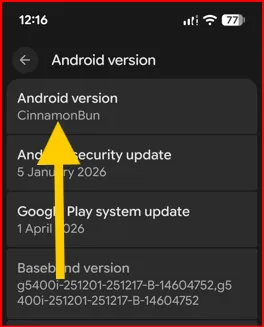
You can check the latest Android 17.0 codename by swiping down the notification panel twice or About phone settings (Settings > About phone > Android version)
Subscribe for ongoing Android 17 updates, Pixel tips, and the latest Android beta.
FAQs:
When is Android 17 Release Date?
Android 17 stable release date is June 2026 (expected), launch with the Google Pixel device. Android 17 beta 1 already launched.
Will Pixel 7 Pro get Android 17?
Yes, Google Pixel devices always receive Android updates before any other brand. Android 17 Beta is already available for Pixel 6 and newer.